
Things have changed a lot in our industry over the years, but one thing that has not changed is the desire to give our customers a transmission that is a more durable and better working unit. Shift kits or basic valve body upgrades have always been a part of accomplishing that by firming up shifts or changing pressures. With the introduction of computer controls, we became limited in what we could do, but with tuning software that has changed, we now have more control than ever before.
 Using tuning software and an OBD II interface, the user can read the OEM engine and transmission programming and modify it. It is the new age version of drilling holes in separator plates or changing accumulator springs.
Getting the process started is straightforward. After installing the tuning software, you will connect the OBD II interface to the vehicle and your laptop. Next, a copy of the ECM and TCM operating software is downloaded and saved to your laptop.
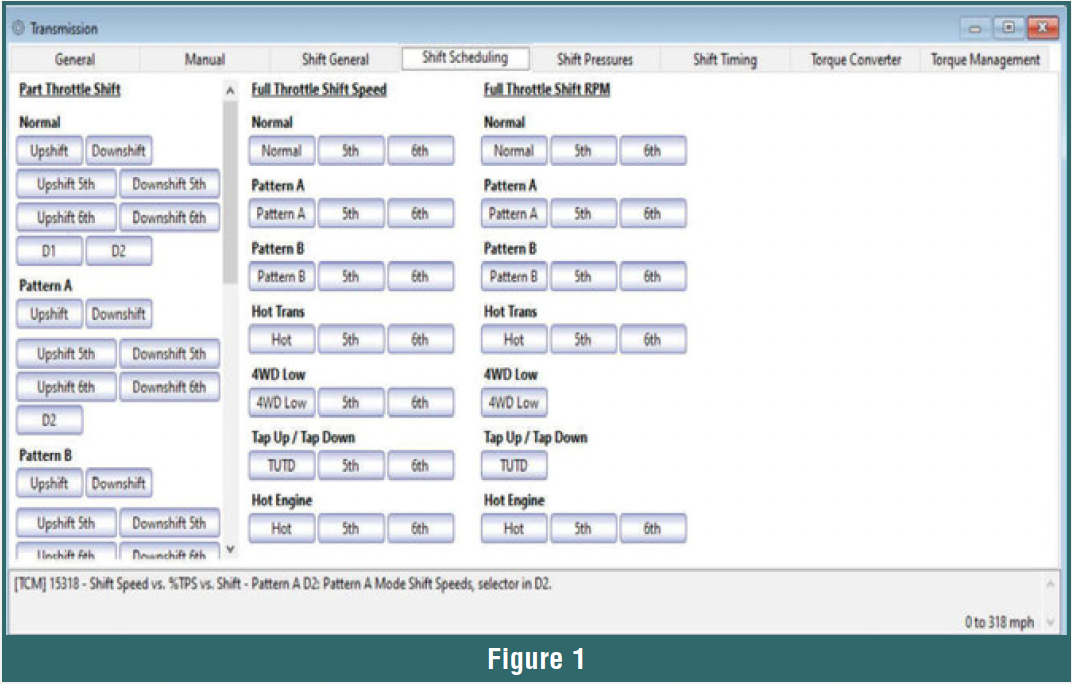
Figure 1 shows an example of transmission controls in a 6L80 file. The tabs across the top are the areas we can make changes to.
- General, Manual, and Shift General tabs are mostly basic vehicle configurations.
- Shift Scheduling is the mph (or output speed rpm) where shifts occur.
- Shift Pressures include baseline pressure, max line pressure, line rise rate, and adaptations.
- Shift Timing is the duration of the shift.
- Torque Converter has what gears lockup is used in, and how it is applied, along with slip rates.
- Torque Management is the amount of engine power reduced during a shift.

 Learning what changes are needed can be tedious. My advice is to forget the computer controls and think of it like an old-school hydraulic unit during a road test. Does it need to shift later, harder, or softer in a particular gear? Does it require higher horsepower, which requires more pressure for the clutches to hold? Make notes so you do not forget when you get back to the shop and have three customers waiting, the phone ringing, and the R&R guy is fussing about a broken bolt.
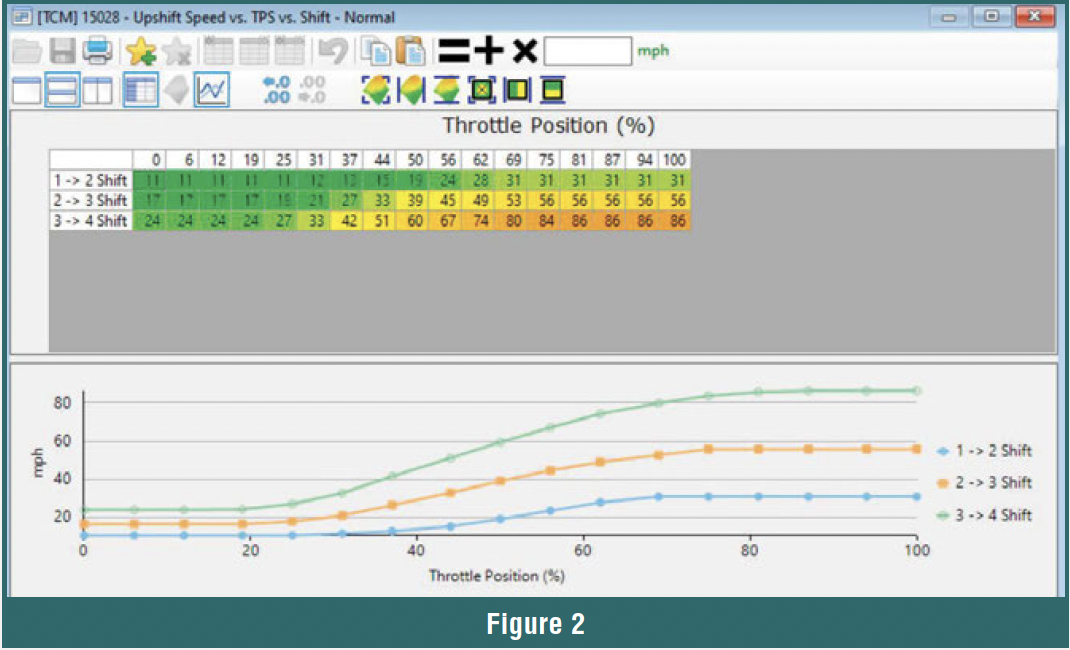
The charts in the file are easy to modify. If you need shifts to be later, go to Shift Scheduling (Figure 2), where you will add to the mph in the upshift chart. These are based on throttle position, so you can increase shift points at light throttle or full throttle differently. This is like putting lighter governor weights in a hydraulic unit.
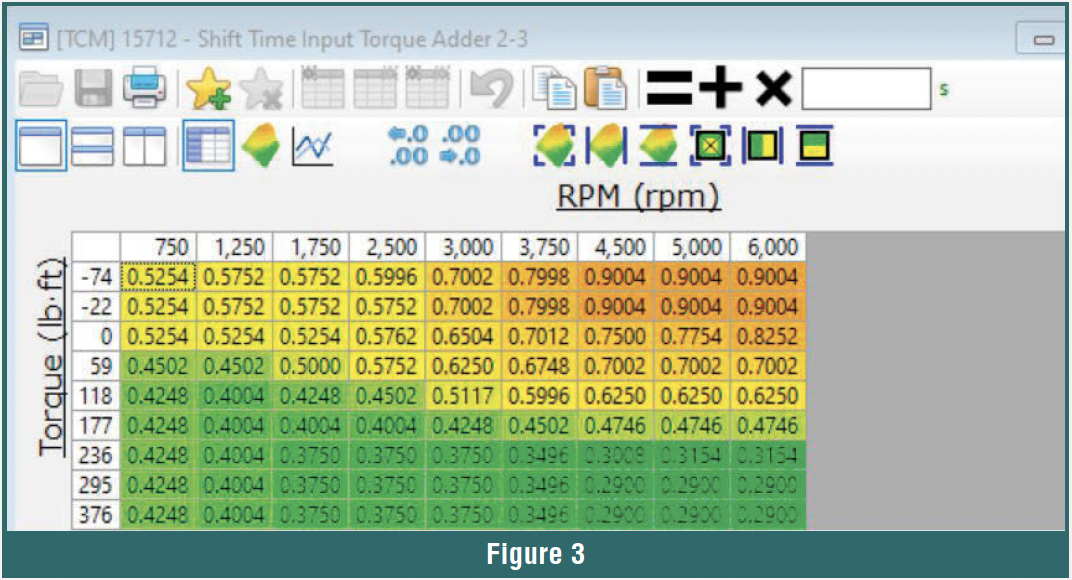 Need a shorter shift on the 2-3? No more dropping the valve body to drill a hole in the separator plate out another 0.010.” Just go to Shift Timing (Figure 3) and lower the shift duration times.
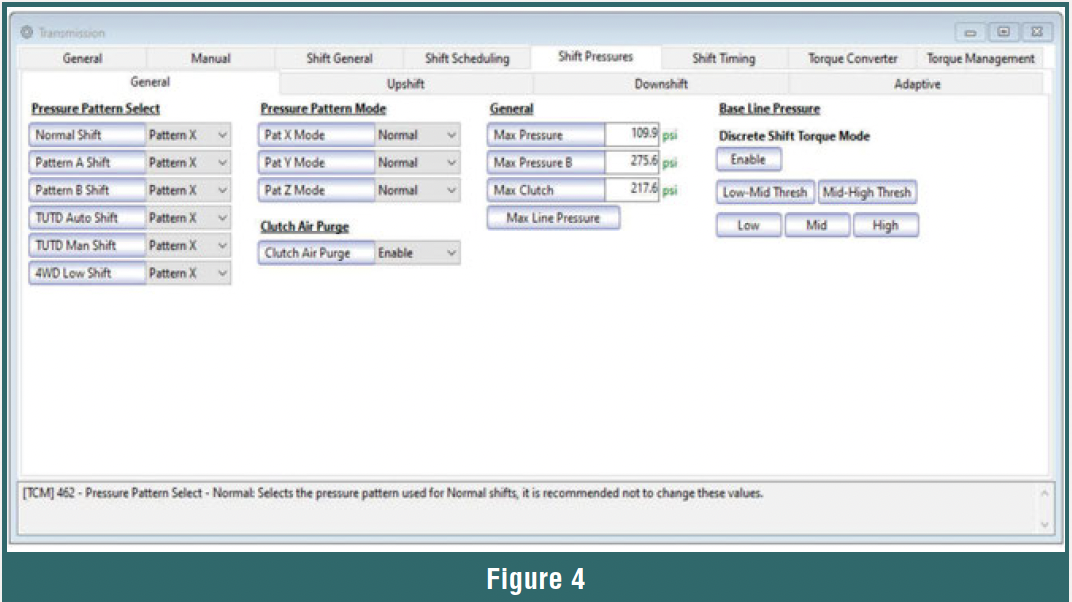
Changing main line pressure is just as easy: go to Shift Pressure (Figure 4), where you can change the baseline and max pressure without changing any springs in the transmission.
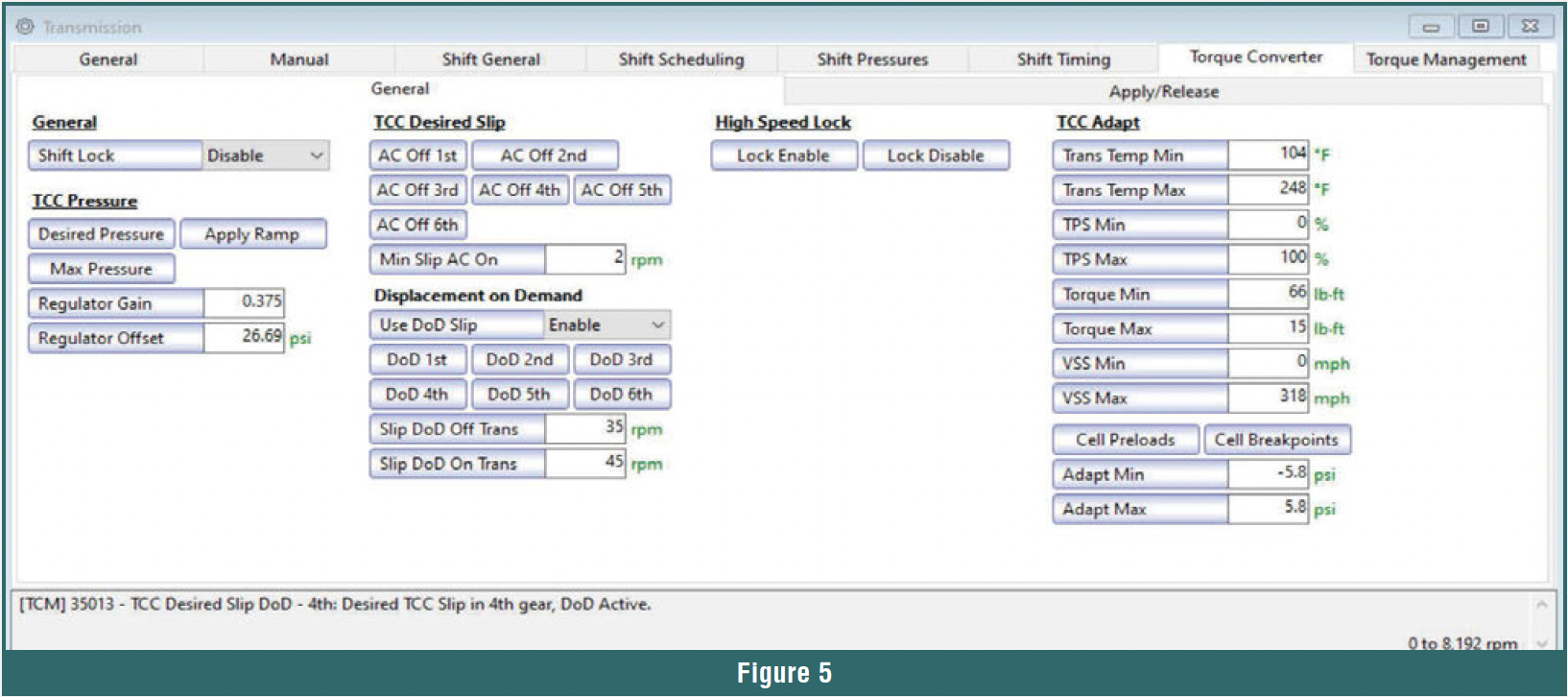
 Have a torque converter shudder? Go to Torque Converter (Figure 5) and zero out the slip rate, then increase the apply pressure. You can also change what gears TCC is used in by changing the MPH in the apply chart. Enter the MPH you want TCC to engage in each gear, or put 300 mph if you do not want TCC at all. If the vehicle does not hit three hundred in that gear, then TCC cannot engage.
 Once you make the adjustments, it only takes a few minutes to write the changes into the computer. Gone are the hours of ATF running down your arms as you swap the valve body, hoping the changes you made are enough. If you need to make another adjustment to your tune, it only takes minutes, and you do not even have to pop the hood or set the lift. Just be sure to drive long enough for the shift to settle in.
There are many other uses for tuning software. For example:
- On Ford 10R80s, you can tune the skip-shift out so it uses all 10 gears all the time. Ford has phased out the skip shifts starting around 2023. Shifts are much smoother when they are sequential, and consistent shift patterns lead to fewer customer complaints.
- On many applications, you can disable the Auto Start/Stop feature. This is one of the features customers often ask for: not having to hit the disable button every time they get in the vehicle. With less wear and tear on the starter and flywheel, it is a definite plus.
- You can change cooling fan operating temperatures in hot areas or for vehicles that are used often. It can be beneficial to lower the temperature at which electric cooling fans come on. It is common for factory fan temperature settings to be 220-230 degrees before fully on.
- Turning off the displacement-on-demand system is another option. Engine failures due to DOD happen often. Lifters collapse, and camshafts are damaged. Disabling DOD can help prolong engine life if the damage has not already been done. This system can also make it hard to diagnose some drivability issues, so turning it off can aid in that as well.
- Speed limiter controls that can lower the maximum speed, or, for racing applications, the limit may need to be increased. Always make sure tires and drive shaft components are rated for higher speeds for safety reasons.
- You can control idle speed at different operating temperatures. In extreme weather conditions, it can help to bump the idle up a bit. Some engines idle as low as 500 rpm, so increasing even 100 rpm can help the air conditioner, heater, and alternator keep up with demands.
- You can change settings for different tire diameters or gear ratios to correct speedometer readings and shift points.
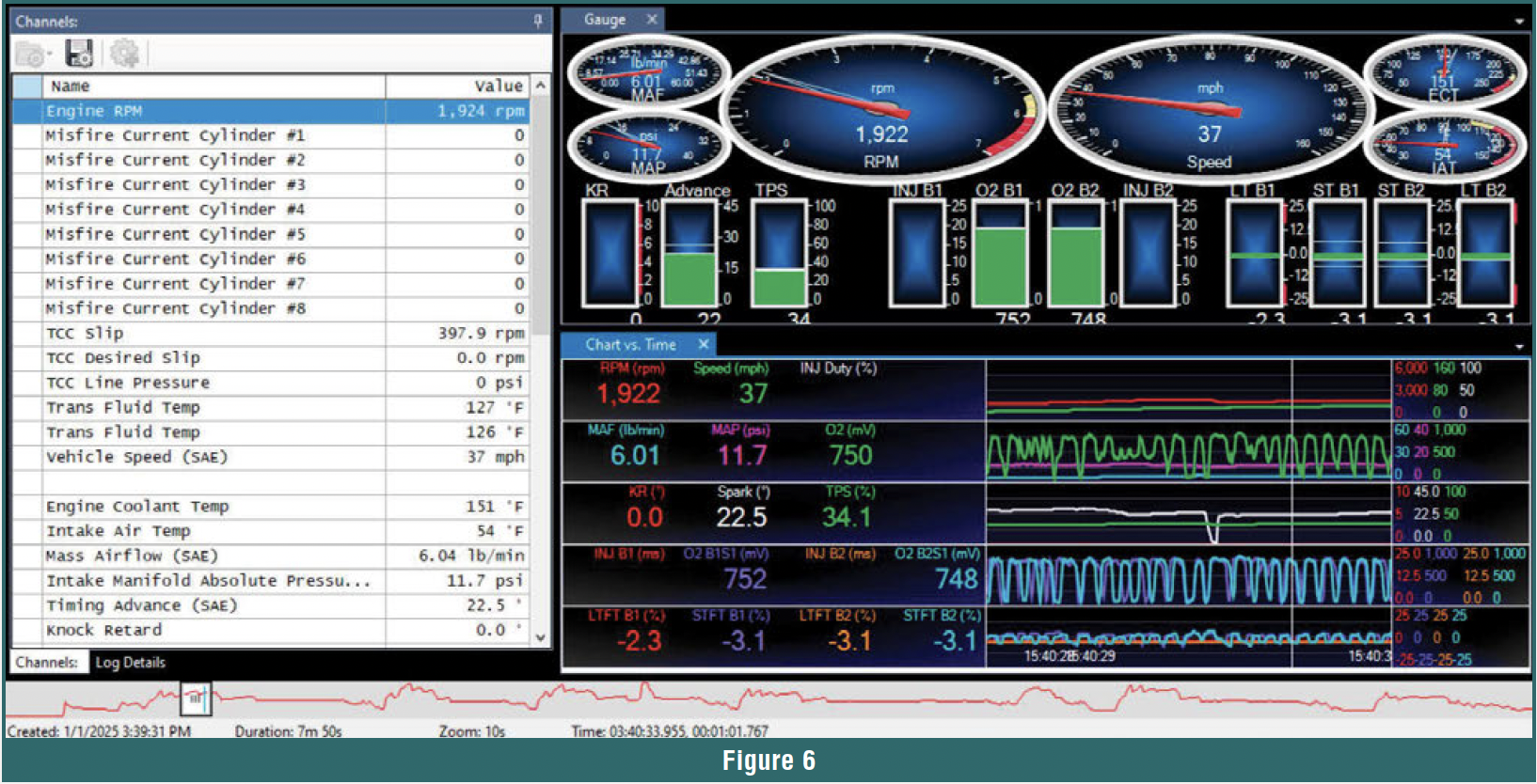
- Often, tuning software includes scanner functions and data logging
 (Figure 6). Take time to learn what your equipment can do and how to use it effectively.
Learning something new is not always the easiest thing to do, but with ever-changing technology, it is necessary. It started 30+ years ago with the old brick scan tool on 4-speed transmissions with a few on/off shift solenoids and has continued to evolve to laptops and a dozen PWM solenoids in a 10-speed. The complexity of computer control systems is not going away, so dedicate some time to learning the programming and tuning aspects of transmission repair. Classes are available to help you get started, and support is there to keep you going.